Congratulations to NASA for landing its latest Rover successfully on the surface of Mars.
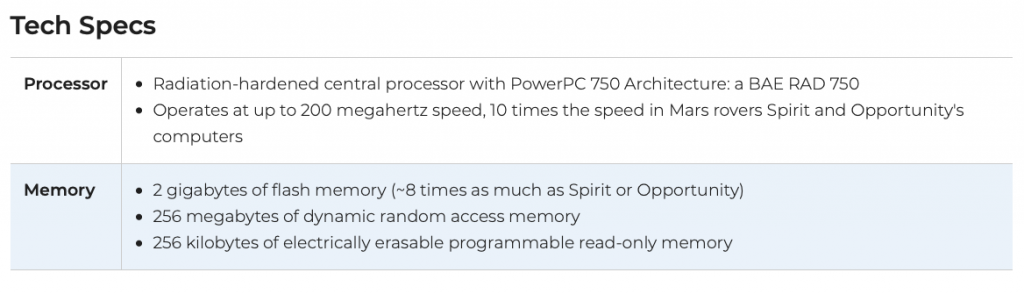
I found this bit of info on Twitter today, but the Rover runs on a 200 MHz PowerPC CPU. I found it fascinating for those of us who still get a bit of use out of our old PowerPC tech. So does NASA, apparently.
When my father died this past summer, my brother and I picked through a garage and house full of vintage Mac gear that he had collected. We hope to share it with the world eventually… and of course hope it still works. Two of the coveted pieces that we grabbed for our own play and memory sake were Color Classics.
If you don’t know the story of Color Classics, these were in the same form factor of the much beloved compact Macs like the Classic, Classic II, and SE/30, but they introduced a color screen. They were designed to be home or education Macs, affordable packages, but in order to get under budget or make them less likely to compete against more robust Macs, the computers introduced a bunch of design choices that made them poor performers. Were they fine for some basic tasks? Sure. As the internet age dawned, these Macs struggled to keep up.
For example, the Color Classic motherboard featured a 32-bit processor on a 16-bit data bus.
This meant RAM expansion was crippled – just a whopping 10 MB of RAM available when maxed out.
I’ve got my Color Classic running after a recap and battery replacement, and it’s true. It’s slow. It’s limited.
A bunch of Classic owners go and upgrade them with other motherboards, and I may do that someday but there is something about having a stock machine working that is just fine.
All of that brings us to the introduction of new Silicon based Macs, the next transition after Apple left behind PowerPC Macs for Intel Macs years ago. While we want to do apple to apple comparisons, these new Macs are different. In some ways, they represent changes in design brought upon by all the needs for smaller, efficient computers in various packages, from smartphones to smart TVs. These new Mac motherboards don’t resemble the Intel and PowerPC boards of old approach, where you wanted to max out RAM and add in expansion cards to get better performance. These new Macs apparently are simply more efficient with that integrated design, meaning that some of those old school paradigms about RAM and video are going to go by the wayside.
I invite you to read this new roundup of reviews to get a glimpse of what people are saying.
Computers need to change. The days of Apple hobbling products to boost sales are long since over. Hopefully, the days of “budget computers” are also over, like when a website sells a computer with a processor promised to be “reliable”. Hopefully, this shifts computing more into the favorable direction of consumer’s budgets, meaning even an 8 GB machine becomes powerful enough for 99% of the people to do content creation and more.
Of course, I’m not jumping on board to buy one of the new M1 Macs right away. I’ll wait and see, first, and look to future products and the maturation of this platform. It’s an intriguing time to see how this impacts the computing landscape.
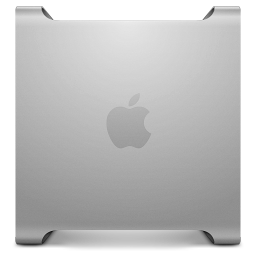
Meanwhile, I’ll keep tinkering on my vintage Color Classic and venerable PowerMac G5.
If you are looking to extend the life of your G4 or G5 PowerPC machine, open source software is a valuable tool for interesting software packages that can provide better security and breath some life into our aging computers.
One of the Linux variants that is available for PowerPC Macs is Lubuntu-Remix.
You won’t find this one on the official Lubuntu pages, because it is maintained by “wicknix” over on the MacRumors forum. He provides a few different versions, including one that is based off of Ubuntu 16 and works better on G5s. The one I have been utilizing to test some things out is MacBuntu, based off of Ubuntu 12 but with some newer software packages and more modern web browser options. Oh, and a shiny little bit of Mac friendliness like a faux Dock.
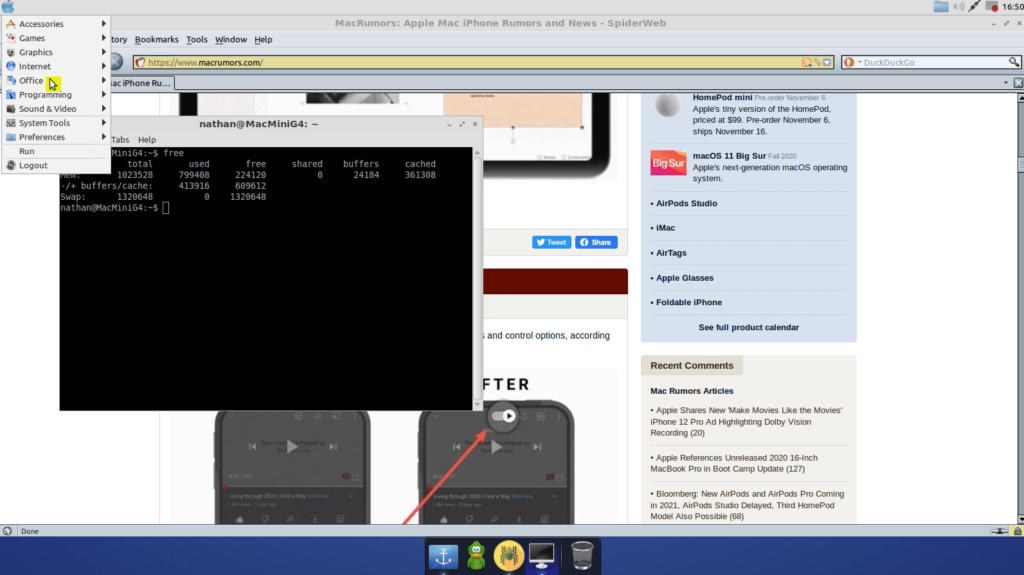
As you can see from the screenshot, MacBuntu is functional and provides some nice software options right out of the box (including ArcticFox pictured above). You will need to pay attention to your boot options, as Linux on PowerPC machines often requires making some adjustments to the boot string to make the GPUs function correctly. Without doing so, the system will likely lock up. There are helpful guides in the thread, and wicknix does a great job answering questions from newbies.
In the screenshot above, I am running MacBuntu on an old Mac mini G4. It doesn’t take too long to boot into the desktop, and it is decently responsive. You can browse the web, although webpages are fairly slow to load. Using terminal is of course nice. I also enable a vnc server, so I can remotely log in and tinker with it a bit. Ultimately, it works, and it’s something nice to mess with on a machine that is old and is limited to 1GB of RAM. Keep all that in mind as you tinker with it.
The other challenge is figuring out ways to load the OS in the first place since using a CD/DVD is likely the friendliest solution, but in my case and many others, the old slot loading CD/DVD drives in these PowerPC machines have reached the end of their life. I ended up just pulling mine out, so I was able to get the G4 to boot off a flash drive. It took some trial and error though.
I won’t say that it is as pleasant to use or speedy as a Leopard or Tiger install. It certainly isn’t as fast as OS 9 (which you can install on these old G4s). But since some of the software is newer, it is a nice alternative to throw in the mix and tinker with.
My father died this month, and one of the gifts he left my brother and I with was a love for tinkering, especially on Apple hardware.
We grew up in a household when our first computer was a TRS-80 Model 4P. Yes, it was portable, in a sense, but my dad was able to upgrade the machine with a hi-res display (or one like it). We wrote stories and played games and even dived into programming. Good times. (The TRS-80 gave me my first taste for text adventure games, which are still the best.)
When the local school system where my dad worked as a counselor began to get computers, especially during a time when you could turn in receipts at local grocery stories, he was the one who was brave enough to figure them out. He brought them home, so we could try our hands at Apple II software and a beautiful little computer called a Mac Classic. We played Dark Castle on that one. So cool. (I learned years later that my friends were jealous, while it was just the norm for us.)
As time went on, my dad started taking us to surplus auctions to pick up piles of old Apple II stuff, various IBM PC equipment, and highly desired Mac gear. Some, he rebuilt and put into classrooms so his little rural Oklahoma school could give every kid access to a computer. Others, he kept to tinker or repair or find some use. A few items ended up being sold.
So, when he died, my brother and I went up on a Sunday morning to begin digging through piles of various old systems, including a couple of rare pieces that might be highly desired, that we helped him store at the old house. Like most vintage Macs, the capacitors are at the end of life. Layers of dust seeped into the motherboards, although a few of the machines ran well. I wished I could have brought more home, but I limited myself to just three or four items for the road trip back to the east coast.
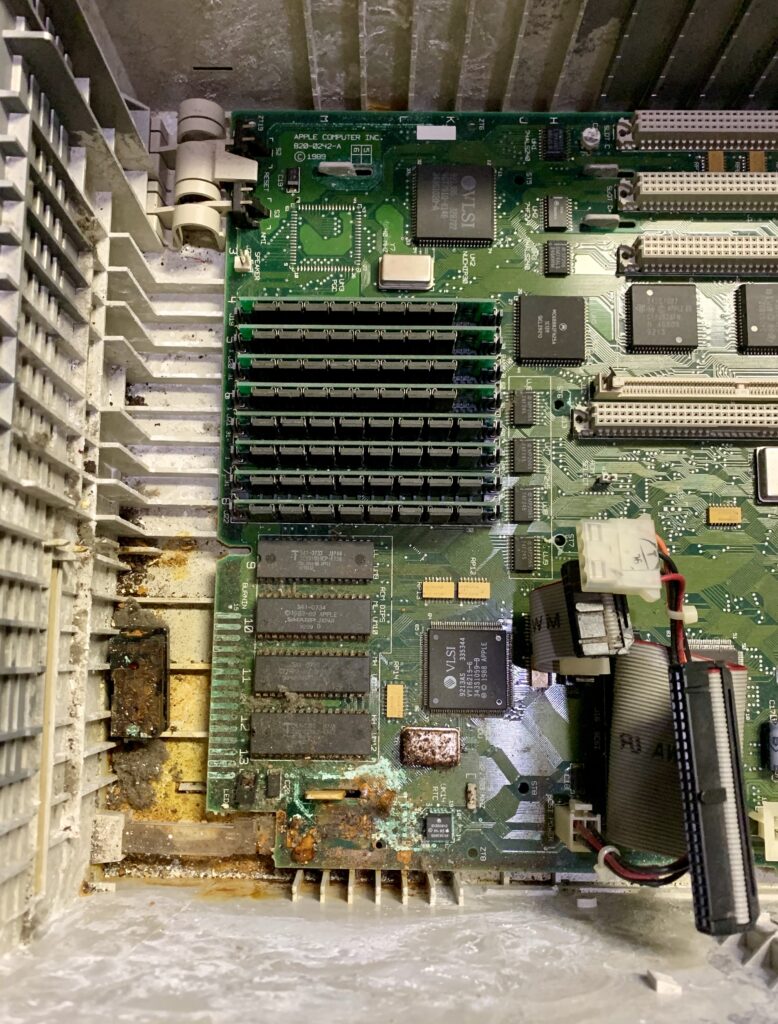
One of the items was this Mac IIci. On initial inspection, it didn’t look too bad. I wasn’t able to test it, so I loaded it up, excited to see if the Daystar card and other expansion slots would make for a really speed vintage Mac to fiddle with. I got it home, plugged it in, and discovered that it wasn’t working. Opening it up more, the battery and cage fell out, and I was greeted with the horror of what happens when one of those little PRAM batteries explode. It ain’t good.
The question is – is the motherboard worth rehabbing? Should I bother replacing the caps and trying to pull more grime and corrosion off the motherboard? Will it run without a battery? If you have answers, please post them in the comments below.
Alternately, the gift my dad gave me – a passion to rehab these old machines – does it matter? Why not try to fix it up for a few bucks? If it doesn’t work, you learned something. (For starters, take out those batteries if you need to store your old computer parts.) You had some fun. You developed some skills that may come in handy down the road. (I really need to get decent at soldering things.)
I suppose I am old enough to have endured two big transitions in the Apple world. The first, of course, was Apple jumping ship from the PowerPC line of chips, ending with the G5 as its last hurrah in that space, to more competitive Intel chips. Today, at WWDC, Apple announced its next transition, promising to release the first Apple Silicone powered Macs by the end of the year.
A Mac Mini style developer’s kit is already being primed and made available to developers to take a look at what this new era will look like.
Already, we are being shown glimpses of new Apple Universal Binaries. (Blast from the past!)
I am always in a wait and see mode, but with the advances that its own chips have given it in the phone and tablet world, this makes sense for Apple. Their chips are excellent and are probably especially ideal for laptops. A MacBook with an Apple chip is going to be fast, efficient, and small, truly fanless without settling for an underpowered mobile Intel chip. It’s kind of exciting. Right now, you can mock up your own experience if you pair a decent iPad with an Apple Keyboard.
What will be especially interesting is the desktop end of it. Will someone really use a Mac desktop with an Apple chip to do their video editing? How will it stack up against the more serious and beefy options in the Intel/AMD world? Is this Apple giving up after recently redesigning the Mac Pro? Apple has committed to continue to support and develop future Intel Macs, and I could see a scenario where Apple’s ARM chips go into the consumer side of things like Mac Minis, MacBooks, and MacBook Pros but everything else remains in the Intel world. However, it’s probably unlikely. We’ll just have to see.
On the other hand, is this the end of any customizability in future Apple Silicone chip-based machines? Will we see, for example, a future Mac mini with upgradable RAM slots? I doubt it. Maybe these future Macs won’t need upgradeability, being far more efficient than current hardware. Maybe their form factors will be simpler, and their price tag a bit cheaper too. Who knows?
Once again, Apple is taking some risks, but in this case, it’s proven. They aren’t dependent on IBM to design and push the limits of its chips. They aren’t going to be tied to Intel either. Their chips are in their hands now. Of course, this could put pressure on Intel to step up and make a case for Apple to remain a customer, working hard to develop processors to fit future products. We’ll see.
Already, Mac users with long memories are wondering when their Intel Macs will be excluded from future Mac updates. Will it be a fast transition like Leopard to Snow Leopard? Or will it take a few cycles?